Manual · 2
The code editor
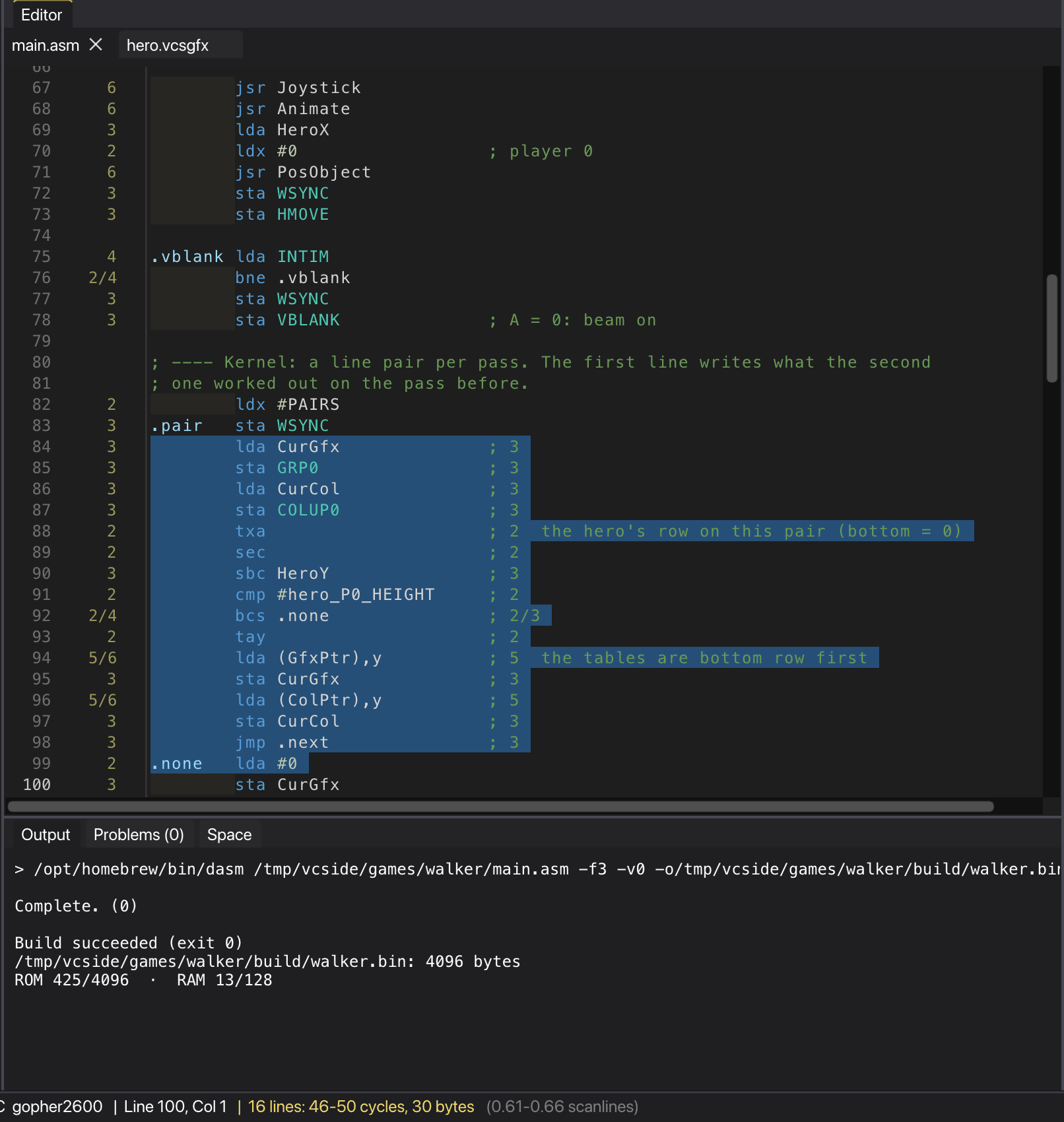
On the 2600 the program draws the picture while the beam moves, so every cycle counts. The editor shows the cycles of each instruction and of whatever you select, and knows every register, label and macro of your program.
The cycle column
Next to each instruction is its cost in CPU cycles. When the cost can change, both numbers are shown:
4/5: one more cycle when an indexed read crosses a page;2/4: a branch takes 2 cycles when it is not taken, 3 when it is, and 4 when it lands on another page.
Whether an address is in the zero page (3 cycles for LDA $80) or absolute (4 cycles) depends on the symbol's value. The editor uses the symbols of the last build, and the constants you have just written, to tell them apart.
Addresses and pages
Click a line's cycles to see where the last build put it: its address (and bank), its place in the ROM file, how many bytes it takes and whether it crosses into another page. Copy takes the text to the clipboard.
In assembly files a thin rule marks where each 256-byte page of the 6502 starts, with the page's address at the right. A branch to the other side of a rule costs one more cycle, and so does an indexed read of a table that crosses one; when a table starts in one page and ends in the next, the rule goes below it and says so. Turn the rules off in View → Show 6502 page separators. Both come from the last build, so build again after moving code around.
Selection totals
Select some lines and the status bar shows their total: the lowest and highest cycle counts, the bytes they take and the share of a scanline (a line is 76 CPU cycles, or 228 colour clocks). It is the quickest way to check that a kernel line fits.
Hover help and completion
Hold the mouse over an instruction, a register or a symbol to see what it is:
- an instruction shows its addressing modes, bytes, cycles and the flags it changes;
- a TIA or RIOT register shows its address, its bits and what it does;
- a label shows its address, and a constant its value.
Ctrl+Space (Cmd+Space is Spotlight) completes instructions, registers and symbols. Labels, constants and macros count as soon as you write them, in the open files and in the rest of the project, before any build. A symbol that the sources no longer define (because you deleted or renamed it) is no longer offered.
Going to a definition
F12 on a label, constant or macro opens the line where it is defined. Holding Ctrl (Cmd on macOS) underlines the word under the mouse; click it to go there.
The same Ctrl+click on a line that names a file opens that file: DASM's include and incbin, C's #include, batari Basic's include, inline and incgraphic, and the .vcsgfx of a rem vcsgfx block. It is looked for next to the file, in the project, in its include folders and in include/.
Ctrl+G goes to a line number, and Go to address goes from an address in the emulator to its line.
Editing
- Find and replace, with next and previous (Ctrl+F, F3, Shift+F3).
- Comment lines, duplicate them, move them up and down, delete them.
- Zoom with Ctrl++/-/0 or Ctrl and the mouse wheel. The font is drawn again at each size, so it stays sharp, and the zoom is remembered.
- Indentation as the file has it: Tab, Shift+Tab, Backspace and Enter go by its levels, a tab or the spaces most of its lines use.
- In C, Enter after
{or after anif (...)without braces goes one level in, and adds the}if the block is not closed yet. A{or}typed on a line of its own goes where its block is, and a block comment goes on with*. - Each indentation level can have its own shade, depending on the theme.
Folding
Long sources can be folded into their parts with the arrows in the gutter, Ctrl+Alt+↑ and ↓, or Edit → Fold all. The regions come from the text itself, with no build:
- DASM:
MAC/ENDM,IF/ENDIF,REPEAT/REPEND, eachSEGandSUBROUTINE, each global label up to the next one, and runs of comments. - batari Basic:
function,data,asm, blocks such asplayer0:up toend, therem vcsgfxblocks, labels and runs ofrem. - C: braces,
#if/#endifand comments.
A folded region leaves its first line with a mark saying how many lines it hides. Folds follow the text as you edit, and open when the cursor goes inside, for example to show a search result or an error.
Syntax colours
Assembly, batari Basic and C each have their own colouring. In assembly, instructions, directives, registers, labels, numbers and comments have different colours, and so do illegal opcodes:
- stable illegal opcodes (such as
LAXorSAX) in purple; - unstable ones in red.
Illegal opcodes
The 6502 has opcodes that are not in the official list. Some always do the same thing and many 2600 games use them; others depend on the chip and are best avoided. Each project chooses what to do with them (illegal_opcodes in the .vcsproj):
| Policy | Effect |
|---|---|
| Allow | Any opcode, with no warning. |
| Stable only | Stable illegal opcodes are fine; unstable ones are errors and are not offered by completion. |
| Warn | Every illegal opcode is a warning in Problems. |
| Forbid | Every illegal opcode is an error, and completion offers none. |